Surfaces
Create a display in the 3D world and draw your own text, images or interface on it.
What Are Render Surfaces?#
A Render Surface is a rectangular display attached to a physics body. Draw ordinary 2D content onto it in GameMaker, and BBMOD displays that content in the 3D scene. You can use it for a device screen, dashboard or information panel.
Blender defines where the display sits and how large it is. GameMaker defines what appears on it. The display follows its body as it moves and rotates.
Create in Blender#
Select your JoltPhysics Root and add a Render Surface from Add → JoltPhysics → Helpers. Give it a Key such as dashboard_display; use that same Key to find the display in GameMaker.
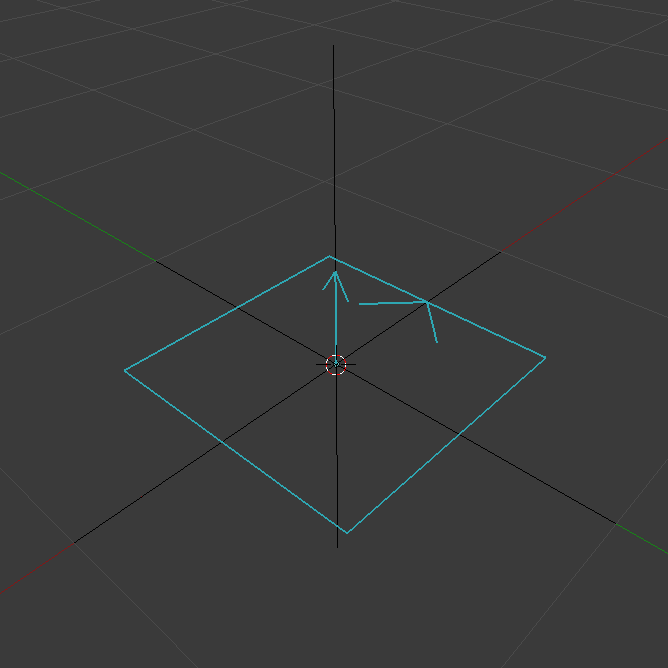
Position and Size#
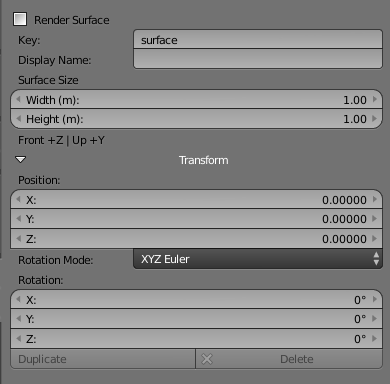
Select the Render Surface to open its settings. Key is the identifier used in code; Display Name is a descriptive label. For the example below, set Key to dashboard_display. Use Position and Rotation to place and orient the display.
Move and rotate the display to fit your object. Set its full width and height in metres using Width and Height, rather than scaling the object with Scale.
The rectangle is centered on its origin and lies in its local XY plane. Its front points along local +Z and its top along +Y. Use the direction guides to face it toward the viewer; the display is one-sided.
Run Validate and export the configuration as Jolt JSON. If you will create the owning body from this same asset, include collision shapes as well: a Render Surface alone does not define a collision body.
Use in GameMaker#
First load the exported asset and create its body as described in Getting Started. The example below assumes asset contains that loaded data, body is a live managed physics body, and your BBMOD renderer is already available. Replace o_control_bbmod_renderer with your project's renderer object if it has a different name.
In the owning object's Create event, after those prerequisites are ready, create and register the display:
display = jolt_asset_create_surface(asset, "dashboard_display", body);
if (is_undefined(display)) {
    show_debug_message(jolt_get_error().message);
} else {
    display.set_resolution(512, 256);
    display.set_update_rate(30);
    display.set_renderer(o_control_bbmod_renderer.renderer);
}
Draw Your Content#
Put this code in Draw Begin, before BBMOD renders the scene. It draws a dark background and the word Ready. Coordinates are in texture pixels, starting at the top-left corner.
if (!is_undefined(display) && display.draw_begin()) {
    try {
        draw_clear(c_black);
        draw_set_color(c_white);
        draw_text(20, 20, "Ready");
    } finally {
        display.draw_end();
    }
}
Draw only when draw_begin() returns true, and finish every successful call with draw_end(). A false result can simply mean the display is not due for a refresh. Keep the block free of changes to render targets or the display's settings.
Display Settings#
| Setting | Effect |
|---|---|
| display.set_resolution(512, 256) | Content resolution in pixels. Higher values allow more detail but use more memory. World dimensions stay unchanged; keep an appropriate aspect ratio. |
| display.set_update_rate(30) | Refreshes content at most 30 times per second during normal operation. Zero means every rendered frame. This does not slow down the display's movement with its body. |
| display.set_visible(false) | Temporarily hides the display. Use true to show it again. |
| display.set_size(1, 0.5) | Changes world width and height in metres, not texture resolution. |
Cleanup#
In Clean Up, release the display before destroying its body or stopping the physics world:
if (!is_undefined(display)) {
    display.destroy();
    display = undefined;
}
Technical Notes#
Render Surfaces use the surfaces[] records in JSON v4. Blender stores the placement and dimensions; pixel content, resolution and drawing callbacks are configured at runtime. The current display is opaque, so drawing transparent pixels does not create holes.
Resolution accepts 1–2048 integer pixels per side; update rate accepts 0–1000 Hz. A lost or resized texture needs fresh content at the next successful draw_begin(). Alternatively, set_draw_callback() enables automatic drawing; successful manual drawing replaces that callback. Do not nest drawing blocks. JOLT_DEBUG_SURFACES shows edges and front direction, including hidden valid displays.
API reference#
Public function and method signatures. Call methods on the returned instance; parameters with defaults are optional.
Related guides#
Verified operation contracts#
These contracts distinguish units, return values, errors and lifetime according to the current implementation. Check results: false, 0 and undefined can mean different things for different methods.
| Symbol / owner | Signature | Operation contract |
|---|---|---|
| jolt_asset_create_surface | jolt_asset_create_surface(asset,surface_ref,body) | Live managed owner and asset reference → JoltRenderSurface/undefined. GPU allocation waits for Draw. Defaults visibletrue, width512px, height aspect-derived clamp1..2048, update_rate0. Opaque +Z front, not a collision body. |
| jolt_asset_get_surface | jolt_asset_get_surface(asset,surface_ref) | Asset + key/UUID → independent validated Render Surface record, undefined on error. |
| JoltRenderSurface.destroy | JoltRenderSurface.destroy() | Idempotent Boolean; removes renderer binding, texture, camera, mesh and material. Rejects during active drawing; does not destroy owner. |
| JoltRenderSurface.draw_begin | JoltRenderSurface.draw_begin() | Draw/Draw Begin before BBMOD: draw only when begin returns true and always pair with end. Begin false can mean refresh is not due. Successful begin disables callback; rejects nested blocks, end restores GPU/matrices/shader, result opaque. |
| JoltRenderSurface.draw_end | JoltRenderSurface.draw_end() | Draw/Draw Begin before BBMOD: draw only when begin returns true and always pair with end. Begin false can mean refresh is not due. Successful begin disables callback; rejects nested blocks, end restores GPU/matrices/shader, result opaque. |
| JoltRenderSurface.get_local_transform | JoltRenderSurface.get_local_transform() | Same spatial convention as AssetPoint: world transform/position/quaternion/component, only get_local_transform is local. undefined on error. |
| JoltRenderSurface.get_position | JoltRenderSurface.get_position() | Same spatial convention as AssetPoint: world transform/position/quaternion/component, only get_local_transform is local. undefined on error. |
| JoltRenderSurface.get_resolution | JoltRenderSurface.get_resolution() | Stored {width, height} m / pixels, or visibility Boolean. These getters do not themselves validate native owner. |
| JoltRenderSurface.get_rotation | JoltRenderSurface.get_rotation() | Same spatial convention as AssetPoint: world transform/position/quaternion/component, only get_local_transform is local. undefined on error. |
| JoltRenderSurface.get_size | JoltRenderSurface.get_size() | Stored {width, height} m / pixels, or visibility Boolean. These getters do not themselves validate native owner. |
| JoltRenderSurface.get_transform | JoltRenderSurface.get_transform() | Same spatial convention as AssetPoint: world transform/position/quaternion/component, only get_local_transform is local. undefined on error. |
| JoltRenderSurface.get_x | JoltRenderSurface.get_x() | Same spatial convention as AssetPoint: world transform/position/quaternion/component, only get_local_transform is local. undefined on error. |
| JoltRenderSurface.get_y | JoltRenderSurface.get_y() | Same spatial convention as AssetPoint: world transform/position/quaternion/component, only get_local_transform is local. undefined on error. |
| JoltRenderSurface.get_z | JoltRenderSurface.get_z() | Same spatial convention as AssetPoint: world transform/position/quaternion/component, only get_local_transform is local. undefined on error. |
| JoltRenderSurface.is_valid | JoltRenderSurface.is_valid() | Boolean live helper and owner; does not imply an allocated GPU texture. |
| JoltRenderSurface.is_visible | JoltRenderSurface.is_visible() | Stored {width, height} m / pixels, or visibility Boolean. These getters do not themselves validate native owner. |
| JoltRenderSurface.render | JoltRenderSurface.render() | BBMOD renderable callback, no success return. Prepares current texture and submits the rectangle; hidden/invalid surfaces do not draw. |
| JoltRenderSurface.set_draw_callback | JoltRenderSurface.set_draw_callback(callback) | Method callback(width, height) or undefined, Boolean. Switches from manual drawing to callback, refreshes content at the next render. |
| JoltRenderSurface.set_position | JoltRenderSurface.set_position(x,y,z) | Boolean; local XYZ m / Euler XYZ°, does not move owner. Cannot change during draw_begin/end. |
| JoltRenderSurface.set_renderer | JoltRenderSurface.set_renderer(renderer) | BBMOD_BaseRenderer or undefined; Boolean. Performs remove/add on replacement; do not add twice. |
| JoltRenderSurface.set_resolution | JoltRenderSurface.set_resolution(width,height) | Boolean; resolution integer1..2048px per axis, rate0..1000Hz, 0 every rendered frame. Marks content dirty; setter allocates no GPU resources. |
| JoltRenderSurface.set_rotation_euler | JoltRenderSurface.set_rotation_euler(x,y,z) | Boolean; local XYZ m / Euler XYZ°, does not move owner. Cannot change during draw_begin/end. |
| JoltRenderSurface.set_size | JoltRenderSurface.set_size(width,height) | Boolean; finite width/height .0001..10000 m. |
| JoltRenderSurface.set_update_rate | JoltRenderSurface.set_update_rate(hz) | Boolean; resolution integer1..2048px per axis, rate0..1000Hz, 0 every rendered frame. Marks content dirty; setter allocates no GPU resources. |
| JoltRenderSurface.set_visible | JoltRenderSurface.set_visible(value) | Strict Boolean → Boolean; hiding cancels touch capture. |